
By Chona · Published September 19, 2026
Runway is ending its Unlimited plan and moving all users to Runway Max, a credit-based system with higher monthly costs. If you use Runway for client video work, you need to audit your usage, pick the right Max tier, adjust your client pricing, and have at least one backup tool ready — before your next billing date.
What Is Actually Happening With Runway Unlimited?
Runway’s Unlimited plan was exactly what it sounds like: flat monthly fee, no cap on video generations. For freelancers billing clients for AI video content, that predictability was the whole point. You knew your tool cost, you knew your margin, done.
Runway is discontinuing that plan and migrating all Unlimited subscribers to Runway Max, its current credit-based tier structure. The company has communicated this change directly to subscribers via email. If you haven’t seen that email, check your spam folder and log in to your Runway dashboard to confirm your migration date.
The core problem for freelancers: credits are not unlimited. A high-volume month — say, five clients each needing a 60-second brand video — can burn through a mid-tier plan faster than you expect. And unlike the old plan, going over means buying more credits or stopping work.
Runway Max Pricing Breakdown: What You’ll Actually Pay
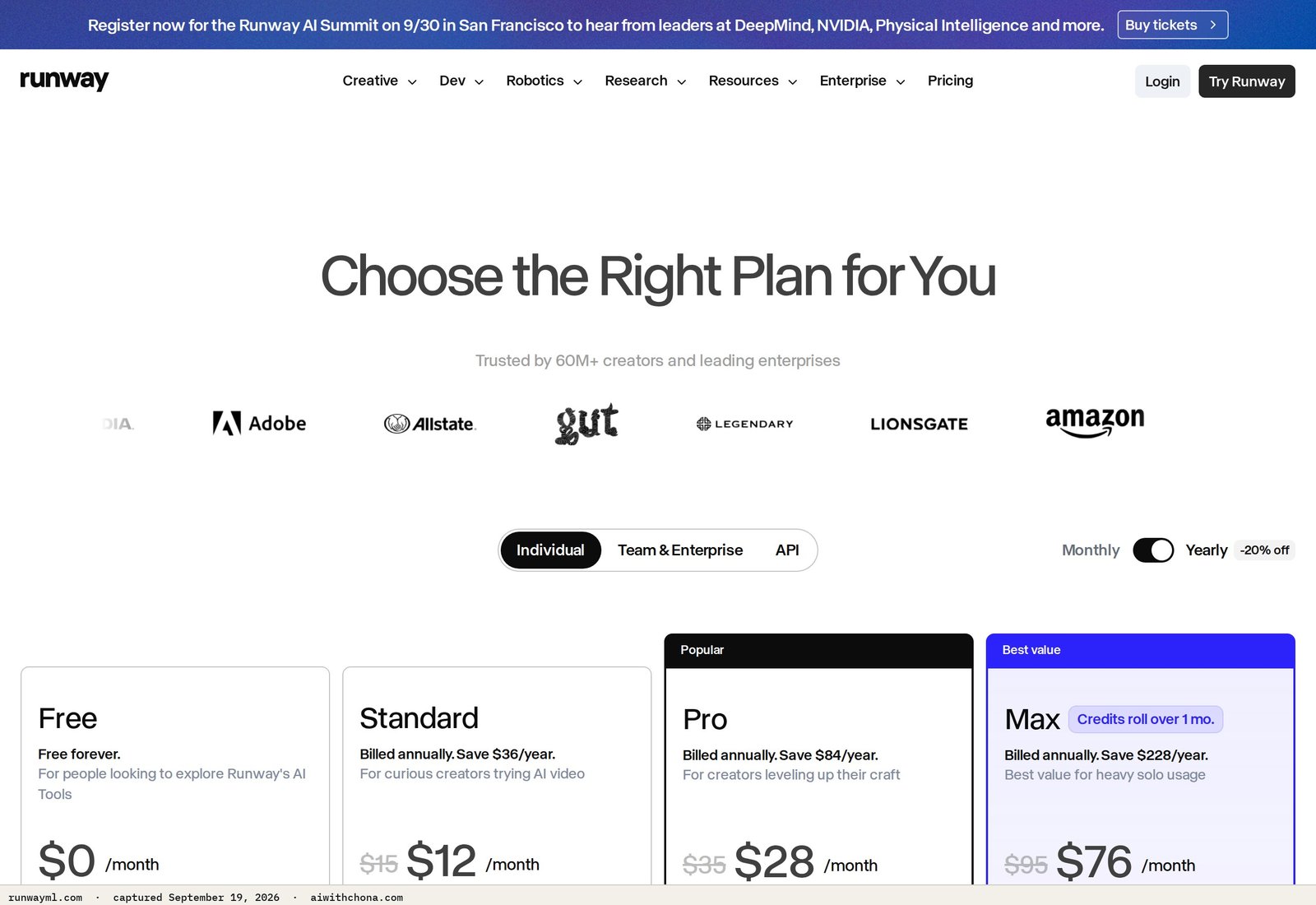
Runway Max runs on a credit system. Each video generation costs a set number of credits depending on duration and resolution. Here is what Runway’s pricing page currently lists for Max plans (confirm your billing date for the exact rate, as Runway has adjusted these during rollout):
| Plan | Monthly (billed monthly) | Monthly (billed annually) | Credits/mo | Best for |
|---|---|---|---|---|
| Max Standard | $35/mo | ~$28/mo | 625 credits | Light freelancers, 2–4 short videos/mo |
| Max Pro | $95/mo | ~$76/mo | 2,250 credits | Active client workload, 6–10 videos/mo |
| Max Unlimited | $195/mo | ~$156/mo | Relaxed limits | Agencies or high-volume solo operators |
The annual billing discount runs roughly 20% across tiers, per Runway’s own pricing page. That is $204/yr saved on Max Pro compared to paying month-to-month — real money if you plan to stay on the platform.
A standard 5-second Runway Gen-3 Alpha generation costs approximately 5 credits per second at standard resolution, meaning a 10-second clip runs about 50 credits. On Max Standard’s 625-credit monthly allotment, that’s roughly 12 full ten-second clips before you hit the wall. For social media cutdowns that may be enough; for narrative brand videos, it probably isn’t.
Runway Unlimited vs Max: The Real Trade-Off Nobody Spells Out
The Unlimited plan was beloved for one reason: you could iterate freely. You could generate ten versions of a scene, pick the best, and not feel the pain. With Max, every bad generation still costs credits. That changes how you work.
- Same Gen-3 Alpha and Gen-4 model access
- Motion Brush, Act One, and lip sync tools
- 4K upscaling on Pro and above
- Commercial usage rights on paid plans
- Unlimited generation iterations — every attempt costs credits now
- Predictable flat-rate billing for client work
- The psychological freedom to experiment without watching a meter
- Legacy pricing that was grandfathered for long-term subscribers
The non-obvious trade-off: freelancers who prompt carefully and deliver on the first or second attempt will barely notice the change. Freelancers who use Runway exploratorily — generating 15 options and picking one — will burn credits fast and need to adjust their workflow or their tier.
Your Step-by-Step Runway Migration Plan
Do these in order. The whole process takes about 90 minutes the first time you sit down with it.
- Pull your last 60 days of generation history. Log in to your Runway dashboard and look at your activity feed. Count the number of clips you generated in a typical month. Multiply by the average credit cost per clip to estimate your real monthly credit demand. If you don’t have this data, assume your busiest month and plan for that.
- Pick the Max tier that covers your busiest month, not your average month. Running out of credits during a client deadline is a business problem. The extra $60/mo between Standard and Pro is less painful than explaining a missed deadline.
- Switch to annual billing if you plan to stay on Runway. The ~20% annual discount locks in your rate and saves $228/yr on Max Pro compared to month-to-month. Do this before your migration billing date, not after — Runway applies the discount at subscription time.
- Download every client project file from your current account. Exported videos, project assets, and any saved presets. Do this before your plan changes, not after. File access has historically been unaffected by plan changes at Runway, but migration windows are not the time to test that assumption.
- Revise your client pricing to include a tool-cost line item. See the pricing section below for exact numbers.
- Set up one backup tool today. Not next month. Today. See the alternatives section below.
- Email any active clients with a one-line heads-up. The script is in the next section.
How to Adjust Your Client Pricing After the Switch
If you were pricing AI video services under the Unlimited plan, your tool cost was fixed and low. Under Max, it’s variable and higher. The fix is simple: add a transparent line item.
Here is a worked example. Say you’re on Max Pro at $95/mo and you deliver 8 client videos a month:
- Tool cost per project: $95 ÷ 8 = $11.88, round up to $15 as a buffer
- Add a line item called “AI rendering & generation” at $15–$40 per deliverable, depending on video length and revision count
- For a 30-second brand video with two revision rounds: $25 is defensible and honest
- For a 60-second video with motion graphics and three rounds: $40 covers your credit burn and leaves margin
Most clients working with freelancers at this level accept small tool-cost line items without pushback, especially if you frame it as “AI processing fee” rather than a vague upcharge. It also trains clients to understand that AI generation has real costs — which protects you long-term as tools evolve.
For landing those clients in the first place, the AI cold email playbook on this site walks you through exactly what to say and how to structure the first outreach message.
The Client Notification Script (Copy and Send This)
Send this to any client with an active project or a retainer in place. Keep it short — clients don’t need the full Runway backstory.
Subject: Quick update on your video projects

Hi [Name],

Just a quick heads-up — the AI video platform I use for your projects is moving to a new plan structure this month. No change to your deliverables or our timeline.

Starting with [project name / next invoice], I'll be adding a small AI rendering line item of $[15–40] per video to reflect the actual processing costs on my end. I wanted to flag it before your next invoice rather than have it appear without context.

Let me know if you have any questions. Otherwise, I'll have [next deliverable] to you by [date].

[Your name]
That message takes two minutes to personalize and eliminates 90% of the friction clients feel when a new line item shows up unexpectedly.
Runway Alternatives for Freelancers: Three Tools Open Today
Every tool below is available to sign up for right now — no waitlist, no invite. Use these as overflow for high-credit months or as a genuine Runway replacement if the Max pricing doesn’t work for your volume.
| Tool | Free plan | Paid entry | Best for | Honest weakness |
|---|---|---|---|---|
| CapCut | Yes, with watermark | $9.99/mo | Social media clips, fast turnaround | Less cinematic output than Runway Gen-4 |
| Kling AI | Yes, limited daily generations | ~$10/mo (Standard) | Longer clip lengths, realistic motion | Slower generation queue on free tier |
| Luma Dream Machine | Yes, 30 generations/mo | $29.99/mo (Plus) | Image-to-video, product demos | Less precise prompt control than Runway |
The honest recommendation: don’t drop Runway entirely if your clients are paying for that quality level. Use Kling AI as a first-draft or overflow tool and deliver the final polish in Runway. That combination — Kling for iteration, Runway for finals — stretches your Max credits significantly further than using Runway for every generation pass.
If you’re building a broader AI service business and want to understand how social media content fits alongside video work, the AI social media graphics playbook here shows how to package both into a single retainer offer.
What Goes Wrong in a Migration Like This (and the Fix)
Failure point 1: Underestimating credit burn on revision-heavy projects. Clients who ask for “just one more tweak” are the biggest credit risk. Fix: build revision limits into your project scope from the start. Two rounds of revisions is standard; a third round triggers a change-order fee that covers the extra credits.
Failure point 2: Hitting zero credits mid-project with no backup. This is a client-relationship problem, not just a tool problem. Fix: set up Kling AI or Luma Dream Machine this week. A $10/mo backup plan is cheaper than one missed deadline.
Failure point 3: Not locking in the annual rate before the forced migration billing cycle. If Runway auto-migrates you to month-to-month Max Standard and you later switch to annual, you may lose a billing period. Fix: log in now, check your migration date, and switch to annual before that date if you plan to stay on Max.
Frequently Asked Questions
Will Runway Unlimited subscribers lose access to their old projects when the plan ends?
Based on Runway’s standard account practices, project files and exported videos remain accessible after a plan change. The company has not announced any deletion policy tied to the Unlimited-to-Max migration. That said, download your completed client deliverables now — before your billing date changes — rather than relying on cloud access during a transition window. Log in to your Runway dashboard and export any project you cannot afford to lose.
Is Runway Max worth it compared to just switching to CapCut or Kling AI entirely?
Runway Max Pro at $95/mo is worth it if your clients are paying $300 or more per video project and expect cinematic motion quality. CapCut at $9.99/mo produces strong social-format content but does not match Runway Gen-4’s output on longer, more complex clips. The practical answer for most freelancers: keep Max Standard at $35/mo for client finals, use Kling AI’s free or $10/mo plan for first drafts and revisions, and only upgrade to Max Pro if you’re consistently running 6+ projects a month.
Can I pause Runway Max between client projects to save money?
Runway does not currently offer a formal “pause” feature on monthly plans — pausing typically means canceling and resubscribing, which can affect your billing cycle and any promotional rates. The better move for freelancers with irregular volume is to stay on the annual plan (roughly $76/mo for Max Pro billed annually per Runway’s pricing page), which averages out the slow months against the busy ones. If you have three months a year with no client work, annual still beats month-to-month across the year.
How do I explain the price increase to a client on a fixed retainer?
Keep it factual and brief. Use the client notification script above, name a specific dollar amount ($15–$40 per video), and frame it as a tool-cost pass-through rather than a rate increase. Most clients on a video retainer already understand that production software has costs. If a client pushes back on even a $20 line item, that’s a signal the retainer rate itself needs renegotiating — the migration is actually a useful prompt to revisit pricing. The cold email and client communication playbook covers how to handle that conversation without losing the account.
What is the cheapest way to stay on Runway after the Unlimited plan ends?
Max Standard at $28/mo billed annually is the lowest Runway Max entry point with commercial rights intact, per Runway’s pricing page. The free plan exists but limits you to watermarked output, which is not usable for client work. If $28/mo still doesn’t fit your margin, your cleanest option is Kling AI’s free tier for drafts and Luma Dream Machine’s 30-generation free plan for simple product videos — both are open to sign up for today with no waitlist.
Your Next Step
The migration itself isn’t complicated. The part that actually costs freelancers money is waiting too long — getting auto-migrated to a tier that doesn’t fit, running out of credits on a live project, or having a client see a surprise invoice change without warning.
Do three things today: log in to Runway and check your migration date, pull your last 60 days of generation history to pick the right Max tier, and send the client notification script above to anyone with an active project. That’s the whole migration, and it takes less than two hours.
If you want a broader playbook for building a sustainable AI service business — including how to price and package video work alongside other deliverables — the free AI Quick-Start guide covers the full picture.
Grab the free AI Quick-Start guide — the exact tools and first steps that actually work, no fluff. Straight to you.