
By Chona · Published August 26, 2026
Most non-technical beginners earn between $0 and $800 in their first 90 days running an AI service business — not six figures, not zero, but somewhere in that range depending almost entirely on how many people they contact. The people who hit the higher end sent at least 30 outreach messages and picked one specific service instead of offering everything at once.
Every week someone posts a screenshot of a $4,000 month they had with AI services. Good for them. But if you’re a normal person deciding whether to spend your evenings building this, you deserve the boring, unsexy version — the one with the real numbers from real month-ones.
This is that version.
I’m going to walk you through what the first 90 days actually look like, what drives income up or keeps it at zero, what your real tool costs are, and give you a copy-paste outreach message that gets responses. No income guarantees. Just the honest math.
What Does AI Service Business Income Look Like in the First 90 Days?
The realistic range for a beginner’s first 90 days is $0 to $800 per month by month three. Here’s what separates the ends of that range:
- $0 by day 90: Sent fewer than 10 outreach messages. Spent most of the time picking tools, watching tutorials, or building a website before landing a single client.
- $300–$500 by day 90: Picked one service (Google Business Profile setup, resume rewriting, or social media posts), set a flat price, and sent 20–30 direct messages to real local businesses or people on LinkedIn.
- $600–$800 by day 90: Same as above, but converted one client to a small monthly retainer ($200–$300/mo for ongoing posts or review replies) on top of a one-off project.
Those aren’t invented tiers — they map directly to the outreach volume. The tool is almost irrelevant at this stage. The message count is everything.
The Worked Math: What a Real First Quarter Looks Like
Let’s run a specific scenario all the way through so you can see the actual arithmetic.
Service chosen: Google Business Profile setup + optimization for local service businesses (plumbers, electricians, roofers).
Price: $300 per client, one-time setup. $150/mo retainer for monthly review replies and post updates.
Month 1: 0 clients. Sent 12 outreach messages. Got 2 responses, 0 conversions. Revenue: $0.
Month 2: 1 client at $300 setup. Sent 22 more messages. Got 4 responses, 1 conversion. Revenue: $300.
Month 3: 1 new client at $300 setup + first client converts to $150/mo retainer. Revenue: $450.
Total 90-day revenue: $750
Tool costs over those 3 months: ChatGPT Plus at $20/mo = $60. Domain + basic hosting for a one-page portfolio = $35 total. Net: ~$655.
That’s not life-changing. But it’s real, it required no technical skills, and the retainer compounds — two retainer clients by month six is $300/mo in recurring income on top of new project work.
For a deeper look at how to price these services once you’re past month one, the guide on how much to charge for AI services in 2026 breaks down rates by service type and experience level.
What Does It Actually Cost to Start an AI Service Business?
Keeping costs low in month one isn’t optional — it’s how you stay profitable before clients arrive. Here’s the honest breakdown:
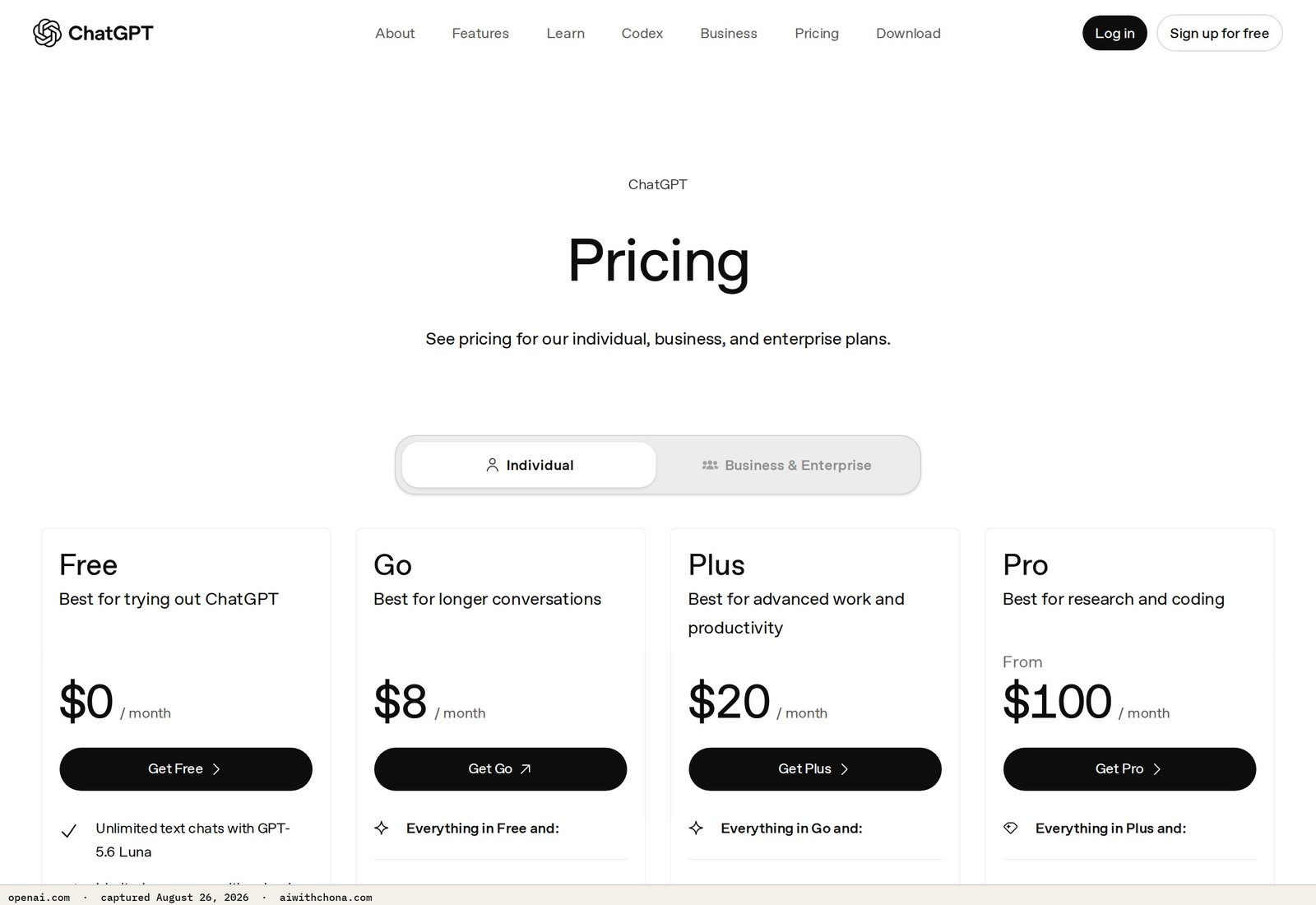
| Tool | What It’s For | Free Plan | Paid Plan | Skip It? |
|---|---|---|---|---|
| ChatGPT | Writing, drafts, client emails, content | Yes — GPT-4o with message limits | $20/mo (Plus, billed monthly) | Start free; upgrade when limits slow you down |
| Canva | Social posts, flyers, menus, portfolios | Yes — solid for most tasks | $17/mo (Pro, billed monthly) | Free plan handles 90% of beginner work |
| Claude | Long-form writing, proposals, client reports | Yes — Claude 3.5 Sonnet with limits | $20/mo (Pro, billed monthly) | Free is enough for light client work; Pro for heavy writing volume |
| Domain + Hosting | One-page portfolio site | No | $10–$20/yr domain; free hosting on Carrd or Canva | Skip paid hosting in month one |
Minimum viable startup cost: $20/mo (ChatGPT Plus only). Comfortable working setup: $37–$57/mo once you add Canva Pro. That’s it. Anyone telling you to spend $200/mo on tools before you have a client is pointing you in the wrong direction.
If you’re not sure whether to upgrade ChatGPT at all right now, this honest breakdown of ChatGPT free vs. Plus in 2026 will help you decide before you spend anything.
Which AI Services Actually Pay in the First 90 Days?
Not all services are equal for beginners. Some take months to show results (like SEO content). Others pay on delivery. For your first 90 days, you want services where the client sees value immediately and you can price them as a flat project fee.
- Google Business Profile setup — $200–$350, one-time, delivered in 48 hrs
- Resume rewriting — $150–$300, delivered in 24 hrs
- Menu/flyer design with Canva — $100–$200, delivered same day
- One-page website for a local shop — $300–$500, delivered in a weekend
- SEO blog content — clients want results before they renew
- Email newsletter management — takes 2–3 months to build trust
- Full social media management — sales cycle is longer, scope creep is real
- Automation builds — clients need onboarding time before they see ROI
The pattern: anything you can deliver in under 72 hours and the client can see with their own eyes pays fastest. A business owner can look at their updated Google Business Profile today. They can read their new resume tonight. That immediacy closes deals.
How to Get Your First Client: The Exact Outreach Message
The single most common reason beginners sit at $0 after 90 days is sending fewer than 10 outreach messages. Not bad messages — just not enough of them. Here’s a message that works because it names a specific problem, offers a concrete deliverable, and gives a price upfront.
Use it on Google Maps (find the business, click their website, find a contact form or email), Facebook business pages, or LinkedIn for resume services. Personalize the business name and service — that’s the only required edit.
Subject: Quick question about your Google listing, [Business Name]

Hi [Owner Name or just "there"],

I was searching for [plumbers / electricians / roofers] in [City] and noticed your
Google Business Profile is missing [a few photos / your hours / the services section —
pick whichever is actually true].

That's usually the reason a listing doesn't show up when people search.

I fix these for local businesses — it takes me about 48 hours and costs $300 flat.
There's no contract, and you'll own everything when I'm done.

Would it be okay if I sent you a free 2-minute audit of your current listing so you
can see exactly what I'd change?

Either way, no pressure at all.

[Your First Name]
[Your phone number or email]
Send this to 30 businesses over two weeks. Expect 4–8 responses and 1–2 conversions. That math gets you $300–$600 in your first real month of outreach. The ones who land two clients in month one sent the full 30 — not 8.
For the Google Business Profile service specifically, the full setup walkthrough is in the $300/client Google Business Profile playbook — it covers exactly what to fix and how to deliver it.
The 3 Failure Points That Kill First-90-Day Income
These are the specific places beginners lose momentum — not vague “mindset” issues, but concrete operational mistakes with concrete fixes.
1. Offering too many services at once. “I do websites, social media, resumes, SEO, and email.” A local business owner reads that and doesn’t know what problem you solve. Fix: pick one service, name the customer it’s for, lead with that. You can add services in month three.
2. Waiting until everything is “ready.” Portfolio site, logo, pricing page, service packages — none of this needs to exist before your first client. A Google Doc with your service description and a Venmo link has closed real deals. Fix: send outreach on day 3, not day 30.
3. Quoting by the hour instead of by the project. Hourly pricing makes clients nervous about the final bill and makes you slow down to justify the hours. Fix: flat project fees only. “$300 for the full setup, done in 48 hours” closes faster than “$75/hr, probably 4–5 hours.”
What Separates a $200 Month from an $800 Month?
It’s not the AI tool. It’s not having a nicer website. The two variables that actually move the number are:
Outreach volume: 10 messages = maybe 1 response. 30 messages = 4–6 responses. The math is boring and it works. Most beginners stop at 10 and conclude “it doesn’t work.”
One retainer conversion: If you convert even one project client to a $150–$200/mo retainer (monthly Google posts, review replies, or a social media package), your baseline income stops resetting to zero each month. That’s the actual leverage point in months two and three.
A $300 project plus a $200/mo retainer plus a second $300 project = $800 in month three. None of that requires technical skill. It requires 30 outreach messages and one follow-up asking an existing client if they want monthly help.
Frequently Asked Questions
How much can a complete beginner realistically earn in their first 90 days with an AI service business?
The realistic range is $0 to $800 by the end of month three, with most beginners landing 0–2 clients. The people who reach the higher end of that range did one specific thing differently: they sent at least 30 outreach messages in a focused two-to-three-week window, targeting a single service and a single type of customer. Beginners who stay at $0 almost always sent fewer than 10 messages and spent the rest of their time on tool setup and branding instead of direct outreach.
Do I need to pay for AI tools before I have any clients?
No — and you shouldn’t. The free tiers of ChatGPT and Canva are enough to deliver your first two or three projects. ChatGPT’s free plan includes access to GPT-4o with message limits that are sufficient for light client work. Upgrade to ChatGPT Plus ($20/mo) only once message limits are actually slowing down a real project, not before. Your first tool investment should follow your first client payment, not precede it.
Which AI service is fastest to get paid for as a beginner?
Google Business Profile optimization and resume rewriting are the two fastest paths to payment for beginners because both are delivered in under 48 hours, priced as flat fees ($200–$350 and $150–$300 respectively), and the client can see the result immediately. Services like SEO content writing or full social media management have longer feedback loops and longer sales cycles, which makes them harder to close and slower to pay in the first 90 days. Start with a fast-delivery service and add slower services once you have a steady client base.
Is it worth building a website before reaching out to potential clients?
Not in the first two weeks. A portfolio website is useful once you have one or two completed projects to show, but building one before you have a client delays your outreach by days or weeks and doesn’t meaningfully increase your conversion rate with cold prospects. A simple one-paragraph description of your service in a cold email or DM, with a flat price and a clear deliverable, is enough to close your first client. Build the portfolio in month two using screenshots of work you’ve already done.
What’s the single biggest mistake beginners make with AI service pricing?
Quoting hourly rates instead of flat project fees. Hourly pricing creates anxiety for clients who can’t predict the final bill, and it inadvertently rewards slower work. A flat fee like “$300 for a complete Google Business Profile setup delivered in 48 hours” is concrete, easy to say yes to, and positions you as someone who knows the scope of the work. Once you’ve completed five or six projects, you’ll know exactly how long each one takes, which makes flat pricing straightforward to set without undercharging.
The Honest Bottom Line
The first 90 days of an AI service business are not a passive income story. They’re an outreach story. The AI tools cut your delivery time from days to hours — that’s real and valuable — but they don’t find you clients. You do that with direct messages and a clear offer.
$0 to $800 in 90 days is achievable without technical skills, without a big tool budget, and without a polished brand. The arithmetic is simple: one service, one price, 30 outreach messages, one retainer conversion.
The next real step: grab the free AI Quick-Start guide — it walks you through picking your first service, setting your price, and writing your outreach message in one sitting, so you can send your first 10 messages today instead of next week.
Grab the free AI Quick-Start guide — the exact tools and first steps that actually work, no fluff. Straight to you.