
By Chona · Published August 24, 2026
Beginner AI service rates in 2026 run $75–$500 per project depending on the service. Your tool costs are $20–$47 a month. Landing your first paying client takes a specific pitch, a specific channel, and usually 20–40 outreach attempts — not a fancy portfolio.
Most pricing advice for AI freelancers reads like this: “Rates vary by experience, niche, and market.” That is technically true and completely useless on a Monday morning when you need to know what to type into a quote email.
This guide gives you the actual numbers — by service type — plus a worked income example, a copy-paste cold email, and the honest first-client playbook. No ranges without drivers. No vague “it depends.”
If you’re still figuring out which service to offer first, the 7-step AI side hustle guide walks through picking your lane before you worry about pricing.
What Can You Realistically Charge as a Beginner for AI Services?
Here’s the honest answer: beginners charge less than experienced providers, but not because AI is doing less work. The discount is for your track record — or lack of one. Once you have two or three completed projects you can point to, your rates move up fast.
The table below covers the six services beginners most commonly start with. “Beginner” means zero client history. “With samples” means you have two or three real or spec projects to show.
| Service | Beginner Rate | With Samples | What Pushes It Higher |
|---|---|---|---|
| Blog post / AI-assisted content | $75–$100 | $125–$200 | Client hands you zero research; you do all interviews and sourcing |
| Google Business Profile setup + optimization | $150–$200 | $250–$350 | Competitive niche (law, dental, HVAC) or photos + Q&A included |
| Social media content package (12 posts/mo) | $300/mo | $500–$750/mo | Scheduling + reporting included; client has active ad spend |
| Simple local business website (3–5 pages) | $300–$400 | $500–$800 | You write all the copy; client needs e-commerce or booking system |
| Resume rewrite (AI-assisted) | $75–$100 | $150–$300 | Executive level, cover letter + LinkedIn included |
| Google Review reply service (monthly retainer) | $100–$150/mo | $200–$300/mo | High-review-volume business (restaurant, hotel); negative review management |
Notice the pattern: what moves a rate from the low end to the high end is never “I’m more experienced now” in the abstract. It’s always a concrete deliverable difference — more copy, more research, more included services. That’s the lever you control from day one.
What Do AI Services Actually Cost to Deliver?
Your tool overhead is the smallest part of this business — and that’s one of the real advantages over traditional freelancing. Here’s the honest stack:
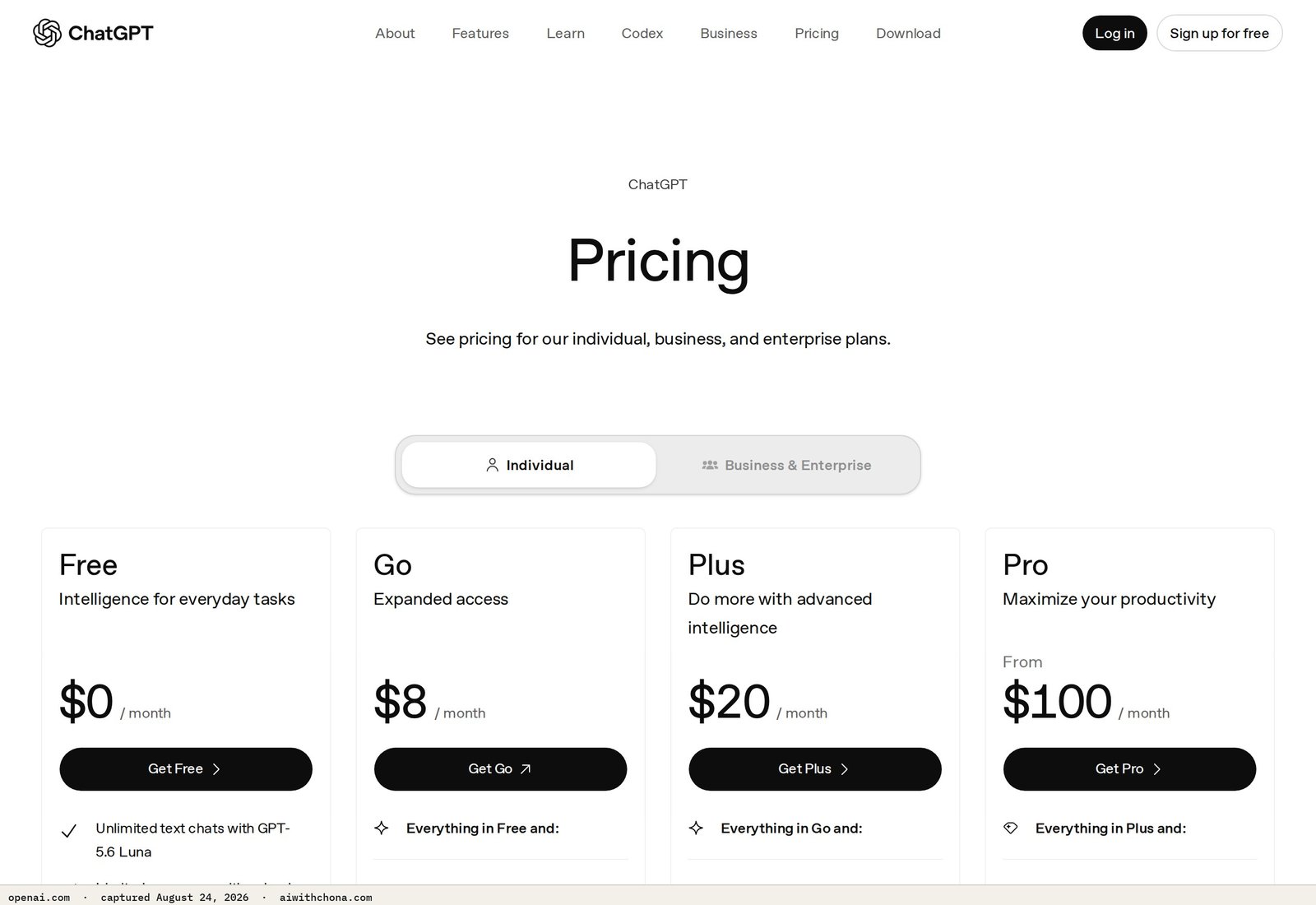
- ChatGPT Plus — $20/mo, billed monthly. The free tier of ChatGPT works for low-volume client work, but Plus gives you GPT-4o with higher message limits and image generation. Most beginners start here.
- Canva Pro — $15/mo (or $120/year if you pay annually). Required for social media content work. The free plan is genuinely usable for simple graphics, but Pro’s brand kit and background remover save real time at scale.
- Domain + basic hosting — $12–$15/mo combined if you’re delivering websites. Namecheap and Hostinger both run under $3/mo for starter hosting; domain registration runs around $12/year.
For a content-only or Google Business Profile service, your real cost is $20/mo (ChatGPT Plus, nothing else required). For a full social media package, add Canva Pro: $35/mo total. For website delivery, add hosting: roughly $47/mo all-in.
That means your first client payment covers your tool costs for months.
Worked Example: What Three Clients Actually Nets You
Here’s the math on a realistic beginner month — no inflated numbers, no best-case scenario:
- Client 1: Google Business Profile setup for a local plumber — $200 one-time
- Client 2: 4 blog posts for a local real estate agent — $75 each = $300
- Client 3: Google Review reply retainer for a restaurant — $150/mo
Gross: $650
Minus ChatGPT Plus: $20
Minus Canva Pro: $15
Net: $615 that month
Three clients. Two of them took one weekend each to deliver. The retainer client takes about two hours a month ongoing. That’s the realistic upside — not $10,000, not zero.
Most people land 0–2 clients in their first 90 days. The ones who land 2 sent at least 30 outreach messages. The ones who land 0 sent 4 and waited.
How to Price AI Services When You’re Just Starting Out
The biggest beginner mistake is hourly pricing. It punishes you for getting faster, which is the whole point of using AI. Charge per project or per month — not per hour.
Use this decision rule mechanically:
- Charge $150 for a Google Business Profile if the client hands you all their info (hours, photos, description draft).
- Charge $250 if you’re writing everything from scratch — you call them, you pull the photos, you write the business description.
- Charge $300 if it’s a competitive niche (attorney, dentist, HVAC) where the profile needs keyword-rich copy and Q&A entries.
The same driver logic applies to every service: your rate goes up when your labor input goes up, not when you feel more confident. That framing makes it easy to explain to clients without sounding like you’re guessing.
For social media packages, the $500+ client package guide breaks down exactly how to structure what’s included so you’re not giving away unlimited revisions.
How to Get Your First AI Services Client: The Exact Steps
Skip the portfolio website for now. You don’t need one to land client number one. Here’s the actual sequence:
- Pick one service. Not three. One. Google Business Profile optimization is the easiest first sale because local businesses understand the problem (“I’m not showing up on Google”) and the price is low enough that they don’t need three meetings to say yes.
- Build one spec sample. Find a real local business with an incomplete Google Business Profile. Optimize it as if they hired you. Screenshot the before and after. That’s your proof of concept — you don’t need their permission to do this as a practice run.
- Identify 30 targets. Go to Google Maps. Search “[your city] + [service type]” — try plumbers, nail salons, chiropractors. Filter for businesses with under 20 reviews or a missing business description. Those are your leads.
- Send the cold email below. Personalize the business name and one detail. Send 10 a day for three days.
- Follow up once, five days later. One short reply. If no response after that, move on.
Copy-Paste Cold Email for Your First AI Services Client
Subject: Quick question about [Business Name]'s Google listing

Hi [First Name or Owner],

I was searching for [service type, e.g. "plumbers in Springfield"] on Google and noticed [Business Name]'s listing is missing a few things that could help more customers find you — specifically the business description and the Q&A section.

I help local businesses get their Google profiles fully set up so they show up higher in local searches. It's a one-time project — I handle everything, takes about three days, and the cost is $200 flat.

I did this recently for another [service type] in [nearby city] and their profile went from incomplete to fully optimized with photos, hours, description, and 10 Q&A entries.

Would it be worth a quick 15-minute call this week to see if it makes sense for you?

[Your Name]
[Your Phone or Email]
Notice what this email does: it names a specific problem they already have, quotes a flat price, and asks for a 15-minute call — not a commitment. That’s why it works better than a general “I do AI stuff” pitch.
The first freelance AI client playbook has a deeper version of this outreach sequence if you want to expand beyond cold email into Facebook Groups and local networking.
What AI Service Pricing Models Work Best for Beginners?
Three models, ranked by how beginner-friendly they are:
1. Flat project fee — Best for one-time work like websites, Google profiles, and resumes. Easy to quote, easy to invoice, and the client knows exactly what they’re paying. Start here.
2. Monthly retainer — Best for ongoing work like social media content or review replies. Predictable income for you, predictable budget for them. Sell this after you’ve delivered one project well.
3. Per-piece pricing — Best for content writing where volume varies. “$85 per blog post, minimum 2 per month.” The minimum matters — it protects your time and keeps the relationship from going cold.
Avoid hourly for now. When you use AI, a task that took a writer four hours now takes you forty-five minutes. If you’re billing hourly, AI makes you earn less, not more. Flat fees flip that math in your favor.
What Goes Wrong (And the Fix)
Failure point 1: Quoting a price with no scope. “I’ll do your social media for $300” means nothing without specifying how many posts, which platforms, and whether you’re scheduling them. Clients expand scope without meaning to, and you’ll end up doing twice the work. Fix: before any project, send a one-paragraph “here’s what’s included” summary in writing — even just in the email thread.
Failure point 2: Underpricing to seem competitive, then resenting the client. If you quote $50 for a blog post, you’ll rush it, it’ll be mediocre, and you’ll feel cheated. $75–$100 for a beginner is not expensive — it’s 45–90 minutes of your time with AI doing the heavy lifting. Quote it without apology.
Failure point 3: Waiting until you feel “ready.” You’re ready when you can deliver the thing. If you’ve done one practice Google Business Profile on a real business and it looks good, you can charge for the next one. Readiness is not a feeling — it’s a completed sample.
Frequently Asked Questions
How much should a complete beginner charge for AI content writing?
Start at $75–$100 per blog post (roughly 800–1,000 words). That’s not a discount — it’s fair for someone without a client track record. As soon as you have two completed samples and one real client, move to $125. At $75, a post that takes you two hours with AI assistance pays $37.50/hour before tool costs — a reasonable starting rate that won’t make you resent the work.
Do I need to tell clients I’m using AI?
You’re selling a deliverable — a finished blog post, an optimized Google profile, a set of social captions. You’re not obligated to narrate your workflow any more than a web designer explains which software they use. That said, never claim you wrote something entirely by hand if a client directly asks. Honesty keeps clients long-term; evasiveness loses them. Most small business owners don’t care how you made it — they care that it’s good and on time.
Can I really charge $300+ for a Google Business Profile as a beginner?
Yes — at the $250–$300 level, once you have one completed sample to show. The $200 flat rate is a fair beginner entry point for a basic profile. The rate moves to $300 when you’re handling everything: writing the business description, adding Q&A entries, sourcing and uploading photos, and setting up the service area. A local HVAC company or dentist will pay $300 without blinking if you can show them a before-and-after. The Google Business Profile $300/client playbook has the exact deliverable list to justify that rate.
What’s the fastest way to land the first paying AI services client?
Cold email to local businesses with incomplete Google profiles is the fastest path — it requires no portfolio website, no social following, and no upfront cost. Identify businesses on Google Maps that have under 20 reviews or a missing business description, send the cold email template above, and follow up once. Most beginners who land a first client within 30 days did exactly this and sent at least 20 messages before getting a yes.
Should I charge more in a big city than a small town?
For local service businesses (Google profiles, websites, social media), yes — modestly. A Google Business Profile setup runs $150–$200 in a small market and $250–$300 in a major metro where local competition is higher and business owners have seen similar services quoted before. For remote work like content writing or resume rewrites, the client’s location doesn’t change your rate — charge based on the deliverable, not their zip code.
Trading Command Center is a Google Sheets portfolio dashboard plus a small, explicit Python bot on the Alpaca API — paper trading by default, every rule on one screen.
Your Next Step
Pick one service from the table above. Do one practice project on a real local business this week — no client needed yet, just a real example you can show. Then send the cold email to 10 businesses on Friday.
If you want the full step-by-step setup — which tools to open, which prompts to use, and how to structure your first invoice — the free AI Quick-Start guide walks through all of it without requiring any technical background.
This article is general business information, not legal or financial advice. Income figures are illustrative ranges based on publicly listed freelance market rates, not guarantees of what you will earn.
Grab the free AI Quick-Start guide — the exact tools and first steps that actually work, no fluff. Straight to you.