
By Chona · Published September 22, 2026
Who This Is For and What You’ll Be Able to Do
Small business owners run meetings every week and walk away with no record of what was decided. Their admin staff — if they have any — spend an hour manually typing notes. You can step in, deliver a clean one-page summary with action items within two hours of each meeting, and charge $200–$400 a month for it.
This guide is for you if you have a Google account, basic writing comfort, and zero technical background. You do not need to code anything. You do not need to be a fast typist. The work is: collect audio or transcript → run it through Gemini → format and send the output. That’s the whole job.
Before You Start: The Four-Item Checklist
- A Google account — free, you almost certainly have one already.
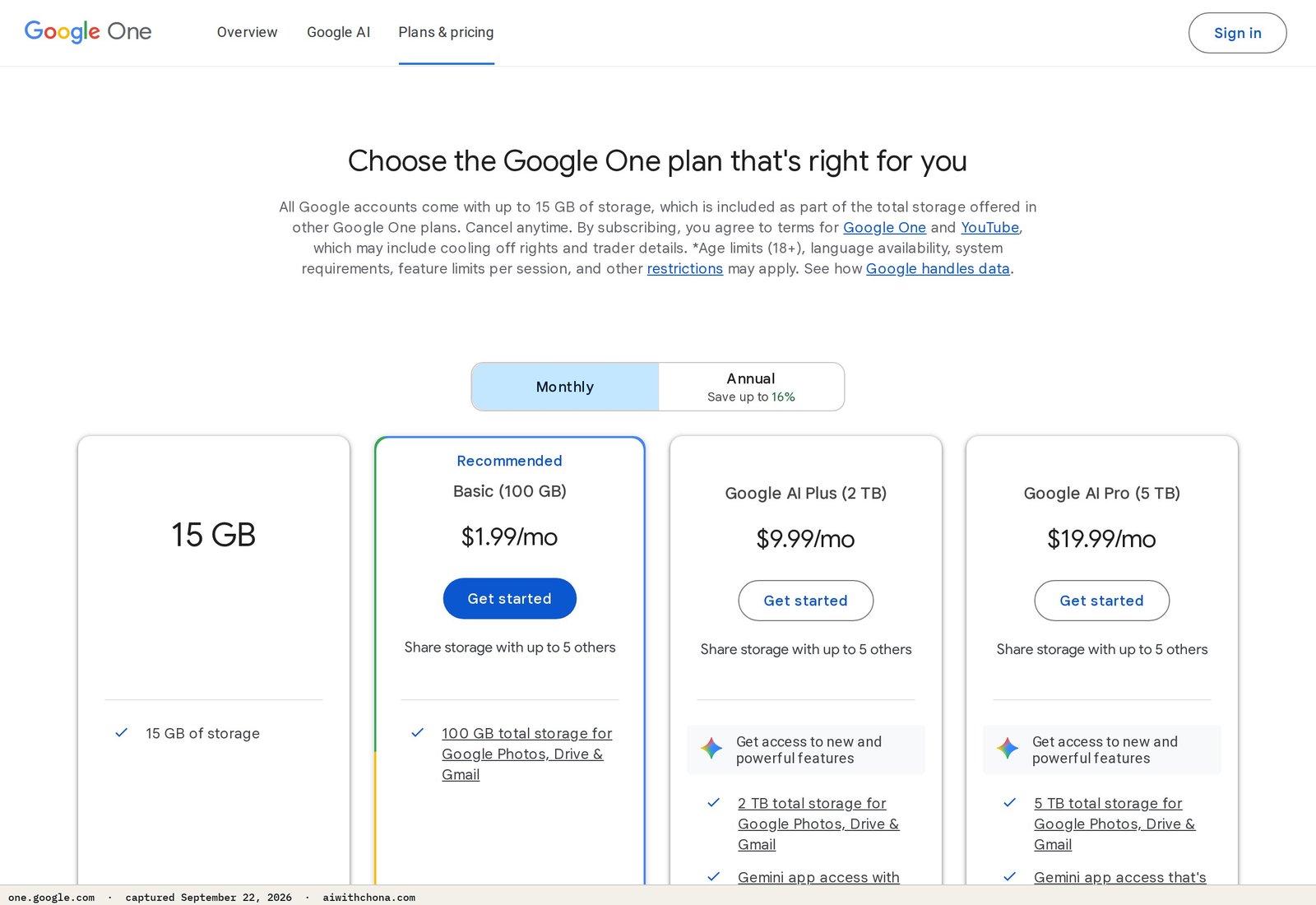
- Google One AI Premium — $19.99/mo, billed monthly (google.com/intl/en/about/products). This unlocks Gemini Advanced, which handles long transcripts. The free tier of Gemini cuts off context too early for a full meeting.
- Otter.ai free plan — for clients who give you a recorded Zoom or Teams call and need it transcribed first. The free plan on otter.ai gives 300 minutes of transcription per month, which covers roughly 5–6 standard meetings.
- One real prospect in mind — a local real estate agent, insurance broker, small law firm, or any small business owner whose name you already know. You will send them the exact message in Step 6 before you finish reading this.
Step 1 — Set Up Your Gemini Workspace (15 Minutes)
Go to gemini.google.com and sign in. If you are on the Google One AI Premium plan, you will see “Gemini Advanced” in the top-left. That label confirms you have the extended context window — roughly 1 million tokens, which according to Google’s product page is enough to process a full hour of transcript text in a single prompt.
Create a Google Doc titled “Meeting Notes Template — [Your Name].” You will paste every finished output here before sending to the client. Keeping a Doc per client lets you build a history they can search later — that’s a small value-add that justifies a recurring retainer over one-off pricing.
Done looks like: You can open Gemini Advanced, type a test question, and get a response. That’s it.
Step 2 — Build Your Transcript Collection System (20 Minutes)
You need a way to get meeting audio or text from the client to you. There are three scenarios:
- Client uses Zoom or Google Meet with built-in transcription on. They forward you the auto-generated transcript file (.txt or .vtt). You paste it directly into Gemini. Zero extra tools needed.
- Client records the meeting but has no transcript. They send you the audio or video file. You upload it to Otter.ai, let it transcribe (usually under 5 minutes for a 60-minute call), download the text, then paste into Gemini.
- Client takes their own rough notes. They paste bullet points into a shared Google Doc and give you access. You paste those into Gemini with the prompt below and ask it to reconstruct a clean summary.
Set up a shared Google Drive folder with each client labeled by their business name. They drop files there; you pick them up. This is the entire “system.” No paid software needed beyond what’s already listed.
Done looks like: You have a Drive folder ready to share and you know which of the three scenarios fits your first prospect.
Step 3 — The Exact Gemini Prompt to Copy
This is the core of the service. Paste the transcript or rough notes, then paste this prompt. Do not describe the prompt — use it exactly:
You are a professional meeting notes editor. Below is a raw transcript (or rough notes) from a business meeting.

Please produce:
1. A one-paragraph executive summary (3–4 sentences, plain English, no jargon).
2. Key decisions made — bullet list, each item starting with an action verb.
3. Action items — a table with three columns: Task | Owner (use names from the transcript; write "TBD" if unclear) | Due Date (use any date mentioned; write "Not stated" if none).
4. Open questions — bullet list of anything unresolved that needs a follow-up.
5. Next meeting date and topic, if mentioned.

Tone: professional, concise. No filler phrases. Do not add information that isn't in the transcript.

--- TRANSCRIPT STARTS BELOW ---
[PASTE TRANSCRIPT OR NOTES HERE]
--- TRANSCRIPT ENDS ---
Run this once. Review the output for any names Gemini misread (it sometimes merges similar-sounding names in long transcripts). Correct those manually — that editing pass is usually under 5 minutes and is the human value you’re adding.
Done looks like: A clean Google Doc with all five sections filled in, ready to copy into an email.
Step 4 — Format the Deliverable
Copy Gemini’s output into a fresh Google Doc. Add the client’s logo at the top if they gave you one (Insert → Image). Add the meeting date and attendee names as a header line. Save the Doc and use File → Share → Copy Link (set to “Anyone with the link can view”).
Send that link by email with a two-line message: “Here are the notes from [Meeting Name] on [Date]. Action items are in the table on page 2. Let me know if anything needs adjusting.”
That’s the deliverable. Simple, professional, and easier for the client to search and share than a PDF.
What This Service Costs You
| Tool | Plan | Monthly Cost | What It Covers |
|---|---|---|---|
| Gemini Advanced | Google One AI Premium | $19.99/mo | Unlimited long-context summarization |
| Otter.ai | Free | $0 | 300 min/mo audio transcription |
| Google Drive / Docs | Free (included in Google One) | $0 | File sharing and document delivery |
Total hard cost: $19.99/mo. Your first client at $200/mo nets you $180.01 in month one. Two clients nets $380.02.
How to Charge for a Gemini Meeting Notes Service
Price by the retainer, not the meeting. Per-meeting pricing trains clients to cancel when things slow down. A monthly retainer creates a predictable relationship.
Beginner rate: $200/mo — covers up to 4 meetings per month (roughly 1 per week), delivered within 24 hours of receiving the transcript. At $200, you’re asking a small business owner to skip one lunch out per week. The objection rate is low.
Experienced rate: $350–$400/mo — covers up to 6 meetings, includes a monthly “summary of summaries” (a one-page recap of all decisions made that month, useful for accountability), and same-day delivery within 4 hours. You move to this rate after your first two clients have been with you for 60+ days and given you a referral or testimonial.
The math on three clients at the beginner rate: 3 × $200 = $600/mo. Minus $19.99 tool cost = $580.01/mo net. Time per client: roughly 3 hours/mo (collecting files, running the prompt, editing, formatting, emailing). Total hours: 9. Effective hourly rate at three clients: $64/hr.
That hourly rate climbs as you get faster. By your fifth or sixth delivery for the same client, you are under 90 minutes total per client per month.
Step 5 — Who to Target First (and Why)
The fastest-paying clients are professionals who run recurring team meetings and have no dedicated admin. In practice, that means:
- Real estate team leaders — weekly team huddles, lots of agents to coordinate, no one writes anything down.
- Independent insurance agencies — weekly pipeline reviews, compliance-sensitive decisions that should be documented.
- Small law firms (2–5 attorneys) — client intake meetings, case strategy sessions, they already know the value of documentation.
- Nonprofit directors — board meetings, grant planning calls, volunteer coordination — and they often have shoestring admin budgets that make $200/mo feel like a bargain.
Skip large corporations for now. They have procurement processes, legal reviews, and 60-day payment terms. You want someone who can say yes over email and pay by credit card the same week.
Step 6 — The First Message to Send a Real Prospect
This is the exact cold outreach email. Replace the brackets with real details — do not send it generic.
Subject: Quick question about your team meetings, [First Name]

Hi [First Name],

I help small [real estate teams / insurance agencies / law firms] turn their weekly meetings into clean, searchable notes with action items — delivered to their inbox within 24 hours of each call.

Most teams I work with spend 45–60 minutes manually writing up what was decided, or just skip it and forget. I handle that for $200/mo for up to 4 meetings.

Would it be worth a 10-minute call this week to see if it makes sense for your team?

[Your Name]
[Phone or Calendly link]
Send this through LinkedIn DM or email — whichever you can find for the person. LinkedIn works better for real estate and insurance because most agents are active there. For law firms, email works better.
Send 30 of these before you decide whether the service works. Most people who land two clients in the first 90 days sent at least 30 outreach messages. Most people who land zero sent fewer than 10.
What Goes Wrong (and the Fix)
Problem 1: Gemini cuts off or misses the second half of a long transcript.
This happens if you paste a very long transcript all at once and the context window fills up. Fix: split transcripts longer than 90 minutes into two halves. Run the prompt on each half separately. Then run a third prompt: “Combine these two meeting summaries into one, removing any duplicates and keeping the action item table unified.”
Problem 2: The client says they don’t record their meetings.
This is the most common objection. Fix: suggest they turn on Zoom’s built-in transcription (it’s free on Zoom’s paid plans and automatic on Google Meet for Google Workspace users). If they resist, offer to join their meeting live as a “note-taker” on the call, take rough bullet notes yourself, and run those through the prompt. Charge $50 more per month for live attendance — you’re trading an hour of your time.
Problem 3: Client pays once and then ghosts the retainer renewal.
This happens when the deliverable feels optional. Fix: on the first delivery, send the Google Doc link and add: “I’ve set up a recurring folder in Drive for you — just drop next week’s recording there by Tuesday and I’ll have notes back by Wednesday morning.” That small routine creates a habit. Clients who form a habit with you renew without thinking about it.
- Retainer pricing over per-meeting feesTargeting professions with weekly recurring meetings
- Delivering within 24 hours — that’s the real differentiator
- Google Drive folder as the “system” — clients feel organized
- Per-meeting pricing — clients cancel the moment their schedule gets busy
- Taking on clients with no recording habit yet (extra friction)
- Skipping the editing pass — Gemini name errors embarrass you
- Pitching before you have a sample output ready to show
If you want to pair this with a broader set of services for local businesses, the playbook on launching a $300/month AI email management service targets the same client profile and can be bundled. And if you are still figuring out which tools to run your service business on without overspending, the free AI stack for service businesses under $20/mo is worth reading before you sign up for anything extra.
Frequently Asked Questions
Do I need Gemini Advanced, or will the free version work?
For most real meetings — 30 to 90 minutes of transcript text — the free Gemini tier will run out of context mid-document and produce an incomplete summary. Google One AI Premium at $19.99/mo gives you Gemini Advanced with a significantly larger context window, which Google’s product page describes as capable of processing up to 1 million tokens. For a service business where the output quality is your reputation, the $19.99 is not optional.
What if my client is worried about sharing confidential meeting content?
This is a legitimate concern, especially for law firms and healthcare-adjacent businesses. The honest answer: Google’s terms for Gemini Apps state that conversations may be reviewed by Google for safety and quality purposes unless the client is on a Google Workspace account with appropriate data protection settings. For highly sensitive clients, advise them to anonymize names in the transcript before sharing with you, or recommend they explore their Workspace admin settings. Do not promise HIPAA compliance without consulting a qualified attorney — that’s a legal claim, not a feature you can verify yourself.
How long does the whole workflow take per meeting?
For a 60-minute meeting with a clean transcript already in hand: about 8 minutes to run the prompt, 5 minutes to edit for name errors, 3 minutes to format the Doc and share the link — roughly 16 minutes total. If you need to run the audio through Otter.ai first, add 10–15 minutes of upload and wait time. Your first delivery will take longer because you are learning the process; by your third delivery for the same client, 20 minutes total is realistic.
Can I charge more than $400/mo for this service?
Yes, if you add adjacent deliverables. The next tier up — $500–$600/mo — typically includes meeting notes plus a weekly internal newsletter summarizing all team activity, or meeting notes plus a monthly board-ready report. Those additional outputs take roughly 30 extra minutes using the same Gemini workflow. The clients who pay at that level are usually 10+ person teams with a genuine documentation problem, not solo agents. Get two clients at $200 first, then test the higher package with a third prospect.
Is the income from this service taxable?
Yes — freelance service income in the US is generally taxable as self-employment income and must be reported on your federal return. If you earn $400 or more net from self-employment in a year, the IRS requires you to file Schedule SE. For state-level sales tax on services, rules differ by state; the Tax Foundation publishes a state-by-state overview at taxfoundation.org. Consult a tax professional for advice specific to your situation — this is general information, not tax advice.
Your First Real Step
You now have the prompt, the pricing, the outreach email, and the workflow. The only thing missing is the name of one person to send that email to.
Open LinkedIn right now. Search “real estate team leader” or “insurance agency” plus your city. Find one person with a title and a face. Copy the outreach script above. Send it before you close this tab.
That message is Step 1. Everything else — the retainer, the recurring income, the word-of-mouth referrals — follows from whether you send it or save it for later. Send it today. If you want to understand how this fits into a broader AI service business that doesn’t fizzle out by month two, read this honest breakdown of why most AI side hustles stall and the three that don’t.
Grab the free AI Quick-Start guide — the exact tools and first steps that actually work, no fluff. Straight to you.