
By Chona · Published August 25, 2026
Most people using Claude for freelance work are leaving money on the table — not because the tool is weak, but because they’re prompting it like a search engine instead of a professional writing partner. This guide fixes that.
By the end, you’ll have the exact workflow, copy-paste prompts, and pricing framework to deliver real paid client projects with Claude — starting this week. This is written for complete beginners: no coding, no agency experience required.
Who this is for: Freelancers, stay-at-home parents, and career-changers who want to sell writing, content, or business document services without a portfolio. Claude is your back office.
Before You Start: What You Need
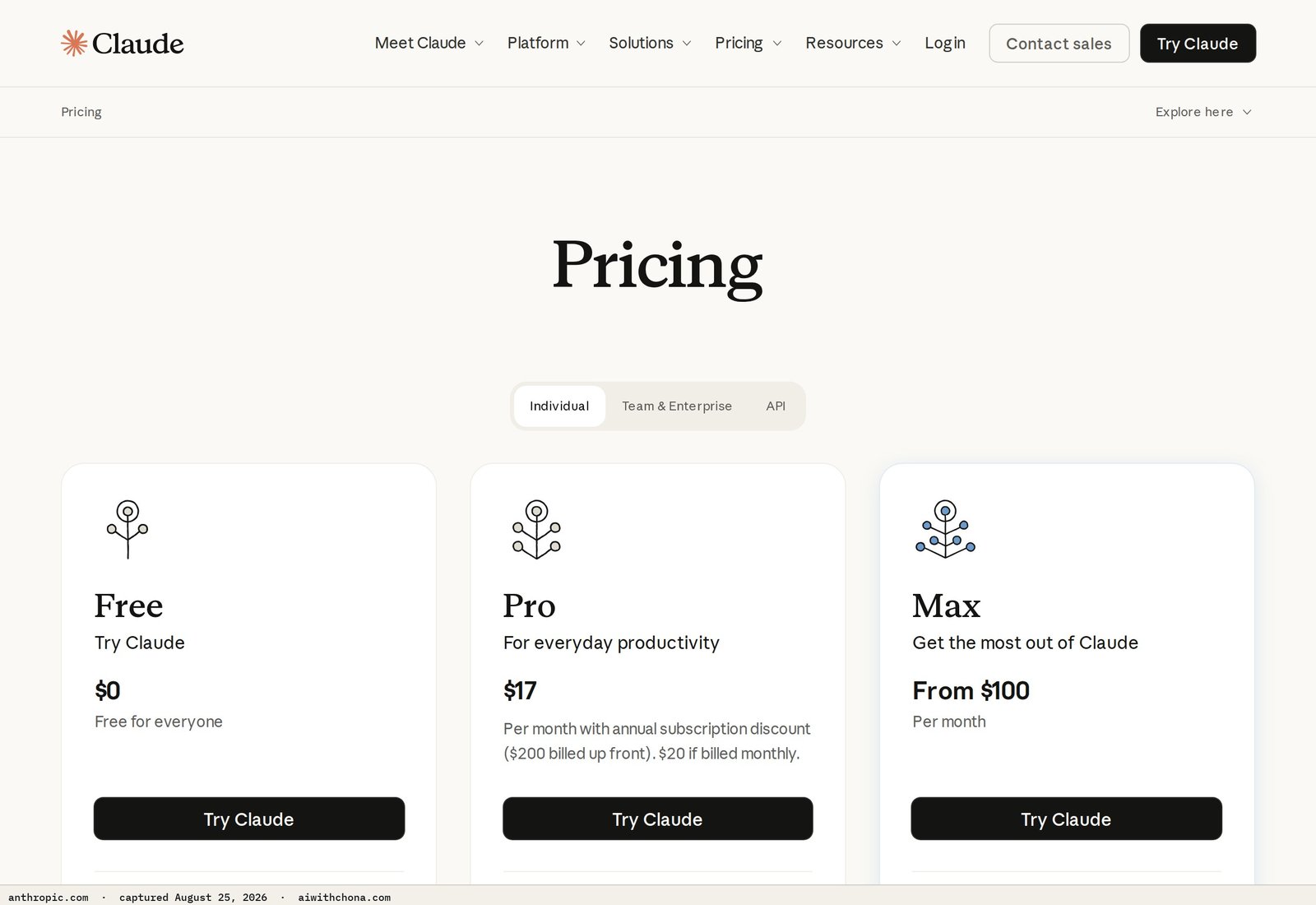
You can start with Claude’s free plan, but it caps your daily messages and will interrupt you mid-project. For client work, Claude Pro at $20/mo (billed monthly, per Anthropic’s pricing page) is the practical choice — it gives you priority access and significantly higher usage limits. That’s your only tool cost to launch.
Before your first client project, have these ready:
- A Claude account — free to start, Pro when you land a paying client
- A Google Doc or Notion page to store your system prompts and client briefs
- One defined service to offer (blog posts, Google Business Profile descriptions, resume rewrites, or email sequences — pick one)
- A simple intake form: client name, business type, target audience, tone preference, and 3 competitor examples
That intake form is the thing most beginners skip. It’s what lets you write a tight system prompt — and the system prompt is what makes Claude’s output actually sound like it’s from your client’s business, not from a generic AI.
One note on privacy before you paste client data into any AI tool: see our guide on protecting client data when using AI tools — the same principles apply to Claude.
Step 1: Write a System Prompt That Makes Claude Sound Like Your Client
A system prompt is a set of instructions you paste at the top of every Claude conversation for a given client. It tells Claude who it’s writing for, what tone to use, what to avoid, and what the goal is. Without it, Claude writes generically. With it, Claude writes on-brand.
Here’s the exact template to fill in for each client:
You are a professional content writer for [Business Name], a [business type] based in [city, state].

Target audience: [describe in one line — e.g., "homeowners in Phoenix aged 35–55 who want reliable local contractors"]

Tone: [e.g., friendly and approachable, no jargon, conversational but professional]

Always do:
- Use "we" and "our" when referring to the business
- Include a soft call-to-action in every piece
- Keep sentences under 20 words where possible

Never do:
- Use technical jargon the audience wouldn't know
- Make claims about being "the best" or "#1" without backing
- Write more than [word count] words unless instructed

Business details to weave in naturally:
- [Fact 1 — e.g., "Family-owned since 2008"]
- [Fact 2 — e.g., "Serves the East Valley area"]
- [Fact 3 — e.g., "Specializes in emergency plumbing"]
What “done” looks like: You have a filled-in version of this saved in your client’s Google Doc folder. You paste it fresh at the top of every new Claude conversation. (Claude has no memory between chats — if you don’t paste it, the context is gone.)
Common gotcha: Beginners write vague tones like “professional.” That’s useless. Get specific: “Writes like a knowledgeable neighbor, not a corporate website.” The more concrete, the better Claude performs.
Step 2: Run the Project Prompt — Here Are the Exact Scripts
After your system prompt, you add the specific task prompt. These are the two you’ll use 80% of the time as a beginner:
For a Blog Post (600–800 words)
Write a 700-word blog post for [Business Name]'s website.

Topic: [e.g., "When should you call a plumber vs. try a DIY fix?"]

Structure:
- Hook opening (2-3 sentences that speak directly to the reader's frustration)
- 3 main points with a subheading each
- A closing paragraph with a soft CTA to contact us

Do NOT use bullet points in the body — write in short paragraphs.
Do NOT start any sentence with "Are you..."
Aim for a 7th-grade reading level.
For a Google Business Profile Description (750 characters max)
Write a Google Business Profile description for [Business Name].

Requirements:
- Maximum 750 characters (count carefully)
- Lead with the main service and city in the first sentence
- Mention [2–3 specific services or differentiators]
- End with a call-to-action like "Call us today" or "Book online"
- Do NOT use hashtags, emojis, or promotional language like "best" or "amazing"
What “done” looks like: Claude returns a draft. You read it out loud — if it sounds like a robot wrote it, go back to your system prompt and make the tone instruction more specific. One revision round is normal; two rounds means your brief needs more detail.
Common gotcha: Claude sometimes ignores character limits. Always copy the output into a character counter (wordcounter.net works fine) before delivering to the client.
Step 3: Edit for Quality — The 10-Minute Review Pass
Claude’s first draft is a strong rough draft, not a finished product. Your job as the service provider is the editorial pass that makes it billable.
Run through these four checks before delivery:
- Brand voice: Read the first paragraph aloud. Does it sound like the client’s business, or like AI wrote it? If the latter, go back to Claude and say: “Rewrite the opening paragraph to sound more like [adjective from the client’s own website].”
- Accuracy: Did Claude invent any facts? Check any specific claims — hours, prices, years in business — against what the client told you.
- CTA: Is the call-to-action specific? “Contact us” is weak. “Call Mike at 602-555-0100” is useful.
- Length and format: Match exactly what you promised. If you sold a 600-word post, deliver 580–620 words — not 800.
This pass takes 10 minutes for blog posts, 5 minutes for shorter deliverables. Budget it into your time estimate.
Step 4: Package and Deliver the Work
Delivery format matters more than most beginners expect. A clean Google Doc with your business name in the header feels professional. A wall of text pasted into an email feels cheap.
Standard delivery setup:
- Google Doc, shared with view/comment access (not edit — you don’t want clients rewriting in your master file)
- Title the doc: [Client Name] — [Deliverable] — [Month Year]
- Add a short note at the top: “Here’s your draft. I’ve included a suggested headline and meta description below the main post. Let me know if you’d like any tone adjustments.”
That last line — offering one round of revisions proactively — reduces back-and-forth by half and makes clients feel cared for without opening the door to unlimited rewrites.
Step 5: What to Charge for Claude-Powered Services
Price by deliverable, not by the hour. Claude makes you fast. If you charge hourly, your speed becomes your penalty.
| Service | Beginner Rate | Experienced Rate | What drives the higher end |
|---|---|---|---|
| Blog post (600–800 words) | $100–$150 | $250–$350 | You research the topic and write the brief; client sends only the idea |
| Google Business Profile setup + description | $150–$200 | $250–$400 | You build and optimize the full profile, not just write the description |
| Monthly content package (4 posts + social) | $300–$400/mo | $600–$900/mo | You manage posting and reporting, not just writing |
| Resume rewrite | $100–$150 | $200–$300 | You include a tailored cover letter and LinkedIn summary |
The decision rule: Charge the higher end whenever the client hands you raw information and you shape it into a finished product. Charge the lower end when the client gives you a detailed brief and you’re mostly formatting and polishing.
For more context on market rates across AI services, the real 2026 AI service pricing guide on this site breaks down what the market will actually pay by service type.
Step 6: How to Land Your First Claude Freelance Client
The fastest channel for a first client is direct outreach to local small businesses — restaurants, contractors, real estate agents, med spas, law offices. They need content, they don’t have time to write it, and they’re not yet drowning in pitches from AI freelancers the way larger companies are.
Where to find them: Google “[service type] near me” in your city, look at the businesses with incomplete Google Business Profiles or no recent blog posts, and reach out.
The exact first message to send (copy and adapt this):
Subject: Quick question about your content

Hi [First Name],

I found [Business Name] while looking for [service type] in [city] — great reviews.

I write blog posts and web content for local [niche] businesses so they show up better in Google searches and give customers a reason to choose them over the competition.

I can put together a sample post for [Business Name] at no charge so you can see if it's a fit before we talk numbers. Takes me about 24 hours.

Would that be useful?

[Your Name]
[Phone or simple website]
That offer — a free sample — converts dramatically better than a pitch with a price attached. Once they see the quality, the conversation shifts from “should I try this” to “how much and how often.”
Realistic first 90 days: Most people land 0–2 paying clients. The ones who land 2 sent at least 30 outreach messages and followed up once. Sending 5 messages and waiting is the most common reason people report that “this doesn’t work.”
For a broader playbook on getting your first freelance AI client — including warm outreach and referral strategies — see this step-by-step guide.
The 3 Things That Go Wrong (and the Fix)
1. The output sounds generic. This is almost always a weak system prompt. Go back and add three specific brand voice instructions — a word the client uses often, a word they never use, and the emotion they want customers to feel. That specificity is what Claude needs.
2. The client wants endless revisions. Scope this upfront: “The package includes one round of revisions. Additional rounds are $30 each.” Put it in writing before the first delivery. Clients who don’t know the boundary will test it.
3. Claude hits a usage limit mid-project. On the free plan, this is common. On Claude Pro ($20/mo), Anthropic’s documentation describes significantly higher limits — in practice, you can complete several full blog posts per day without hitting a wall. If you’re doing client work at any real volume, the free plan will slow you down within a week.
Claude vs. ChatGPT for Client Work: The Honest Difference
This comes up constantly, so here’s the short version: Claude follows complex, multi-part instructions more reliably than ChatGPT on most writing tasks. It’s less likely to drift from your system prompt mid-document. ChatGPT’s strength is breadth — it’s better for research summaries, code help, and tool integrations via plugins.
For the services in this guide — blog posts, GBP content, resumes, email sequences — Claude is the better default. We’ve covered the full comparison in the Claude vs. ChatGPT for writing honest breakdown if you want the side-by-side detail.
- Follows multi-step system prompts reliably
- Strong long-form drafts (500–2,000 words)
- Minimal hallucinated facts in brand-specific content
- Honest about uncertainty instead of confidently wrong
- No memory between sessions — paste your system prompt every time
- No native image generation
- Free plan usage limits will interrupt real client work
- Occasionally over-qualifies statements — watch for hedging language in drafts
Realistic Income Math: What 3 Clients Actually Looks Like
Let’s run the real numbers so you know what you’re building toward.
Three local business clients on a monthly content package at $300/mo each = $900/mo gross. Subtract Claude Pro at $20/mo. Net: $880/mo working roughly 10–12 hours a month once you have your system prompts dialed in.
That’s not a salary. But it’s a real side income built on a $20 tool, no office, and a skill you can learn in a week. Scale to 6 clients and you’re at $1,760/mo net. At that point the bottleneck is usually client management time, not Claude’s output speed.
The honest caveat: those numbers assume clients who pay on time, don’t demand constant revisions, and renew month-to-month. In practice, expect some churn. Budget for one client dropping off every few months and replace them before it happens.
Frequently Asked Questions
Can I use Claude’s free plan for client work, or do I need Pro?
You can start with the free plan to practice and build your workflow, but for active client work it will slow you down. Anthropic’s free tier has daily message limits that kick in before you finish a full project day. Claude Pro at $20/mo removes that friction. Since one $150 blog post project more than covers the monthly cost, upgrading before your first paid client is delivered is the practical move.
Do clients need to know I’m using Claude to write their content?
Legally, there’s no universal disclosure requirement for AI-assisted writing in the US as of 2026 — but this is worth addressing in your client agreement. The professional standard is to position yourself as an AI-assisted content strategist who edits and quality-controls all output. Many clients actively want AI-assisted work because it’s faster and cheaper; others prefer you use it quietly. Ask in your intake process and document what was agreed.
How long does a typical Claude client project take from brief to delivery?
A single 700-word blog post takes roughly 45–90 minutes end-to-end for a beginner: 15 minutes to fill in the brief and system prompt, 5 minutes for Claude to draft, 30–45 minutes for your editorial pass and formatting. After 5–6 projects with the same client, that drops to about 30–45 minutes because your system prompt is already dialed in and you know the client’s quirks.
What services can I realistically sell using only Claude?
The highest-demand, beginner-accessible services are: blog post writing, Google Business Profile descriptions and Q&A content, email newsletter drafting, resume and cover letter rewrites, and social media caption packs. All of these can be delivered entirely through Claude with no other paid tools. Services that require images, video, or web design need additional tools layered in — Claude alone won’t cover those.
Is Claude safe to use with real client information?
Anthropic states in its privacy documentation that Claude.ai conversations may be reviewed for safety and model improvement by default. For sensitive client data — financials, personal identifiers, legal documents — either use Claude’s API with data-off settings or anonymize the information before pasting it in. For typical marketing content and business descriptions, this is rarely a practical concern, but it’s worth disclosing to clients who ask.
Trading Command Center is a Google Sheets portfolio dashboard plus a small, explicit Python bot on the Alpaca API — paper trading by default, every rule on one screen.
Your Next Step
The fastest way to see if this is right for you: open Claude, paste the system prompt template from Step 1 with a real local business filled in (a restaurant or contractor near you works fine), and run the blog post prompt. You’ll have a real draft in under 5 minutes.
That draft is your portfolio sample. Take it to one business this week and offer it free. If they like it, you have your first lead.
If you’d rather not set up the full workflow from scratch, the free AI Quick-Start guide at the end of this page walks through the exact intake form, system prompt library, and pricing sheet I’d hand a beginner on day one.
Grab the free AI Quick-Start guide — the exact tools and first steps that actually work, no fluff. Straight to you.